Posts

Showing posts with the label helix

Live Transcoding HTTP/MMS/RTSP streaming channel 5

Image
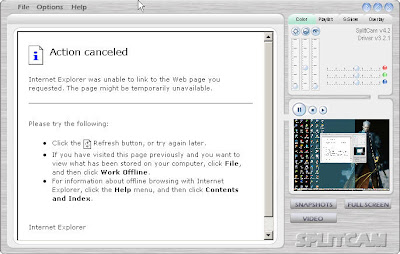
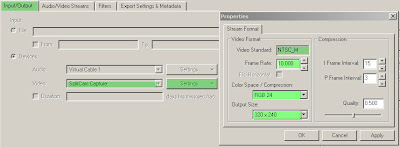
Setting Helix Mobile Producer - using SplitCam as Video Capture Device - using your physical Audio Device - using Virtual Audio Cable as your virtual audio device After this just encode, send your sdp to Helix Server and you can play it ...

Live Transcoding HTTP/MMS/RTSP streaming channel 4

Image
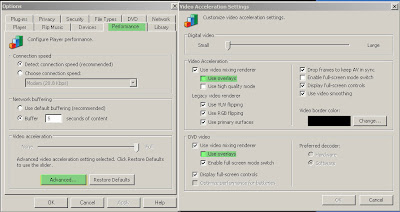
Setting on Windows Media Player Challenge : - screen from Windows Media Player CAN NOT be captured Solution : - Just disable "video overlay" on WMP settings. Challenge : - If your HMP Machine DO NOT have physical Audio Device Solution : - Just take Virtual Audio Cable as your Device NB: If you have physical Audio Device DO NOT change anything on "Devices" Windows Media Player settings. After that, just play your favourite channel, for example : MTV Asia : rtsp://totbd1.streaming.totbb.com/Encoder10 Just full screening windows media player window, cause SplitCam capture full screen.

Live Transcoding HTTP/MMS/RTSP streaming channel 3

Image
Install Virtual Audio Cable - download it - install it - go to Virtual Audio Cable control panel NB: this tutorial ONLY used when you DO NOT have any physical Audio Device.

Live Transcoding HTTP/MMS/RTSP streaming channel 2

Image
Installing Splitcam as Virtual Video Capture Device - download splitcam from anything you want ... :p - installing it as usual - set value frame per second 10 - set SplitCam will capture full screen

Live Transcoding HTTP/MMS/RTSP streaming channel 1

Image
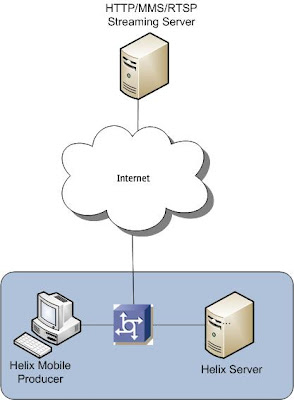
Here the scenario : Challenge : how to make another channel like MTV Uber, MTV Asia, or Eurosport channel be your streaming production. Exampel Live channel : mtv asia - rtsp://totbd1.streaming.totbb.com/Encoder10 Here some dirty way to make it .... I did these following : Install this on HMP Machine - Windows Media Player as streaming player - SplitCam as Virtual Video Capture Device - Helix Mobile Producer as sdp production that feed to our Helix Server - Virtual Audio Cable as Virtual Audio Capture Device, if you DO NOT have physical Audio Device

Channel Redundant on Helix Server

Image
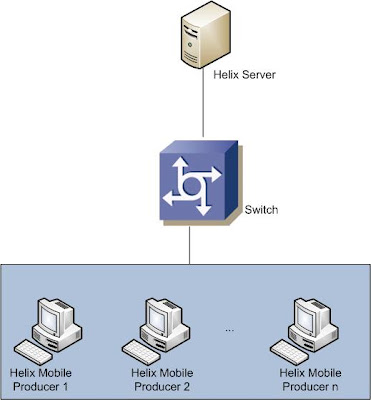
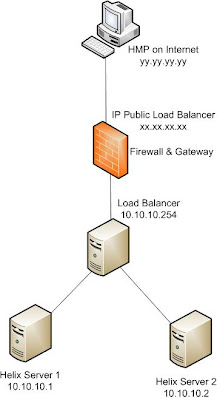
Here the Architecture : Description : Assume for NBC Channel, we want to channel redundant, it means that, more than one feeds from HMP. For HMP 1: run HMP, we get sdp like this, for example: nbc.sdp send sdp file to Helix Server on ../Content/rtpencodersdp/ directory. rename nbc.sdp to nbc.sdp.1 at Helix Server side. Just follow this for HMP 2 and so on. After this we get list on ../Content/rtpencodersdp/ directory like this : # ls -la --------------- nbc.sdp.1 nbc.sdp.2 --------------- Go to Helix Server Admin Web Interface: Just add the mount point, on example to /redundant/ Result : - redundant access through rtsp ://ip_helix/redundant/nbc.sdp - we can also access rtsp://ip_helix/rtpencoder/nbc.sdp.1, rtsp://ip_helix/rtpencoder/nbc.sdp.2, and so on. - at least one of nbc.sdp.n running, we still can access rtsp ://ip_helix/redundant/nbc.sdp Great thanks to Mas Abi, he has a great of Streaming Solution.
Streaming Solution with Helix and BIG-IP Load Balancer

Image
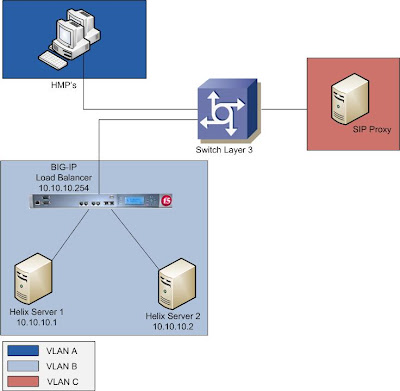
Here the architecture : Network Element Information 1. Helix Mobile Producer - feeds sdp with multicast mode to each of Helix Server - can be connect to each of Helix Server - on VLAN A - default gateway on Switch Layer 3 2. Helix Server - Each of Helix Server can connect to each of HMP's - Communicating with SIP Proxy using IP Virtual created on BIG-IP ( 10.10.10.254 ) - Default Gateway on BIG-IP - For communicating with HMP's, just add gateway for IP HMP's to Switch Layer 3 directly. 3. BIG-IP - Allocating IP Virtual for Helix Server's redundant mode. - Default Gateway on Switch Layer 3 - Define load balancing procedure for Helix Server 1 & 2. Active - Active using Round Robin. - NAT 10.10.10.1 to 10.10.10.254, it means that for outgoing connection initiated by 10.10.10.254, this action done by Helix Server 1. - if we aren't using NAT, we can use SNAT (10.10.10.254 to 10.10.10.1 & 10.10.10.2 ) but it useless only when comunicating with SIP Proxy that using...

Feeding Helix Server from Internet with Unicast

Image
I think this case confused me on last week, but now it solved. Thanks God ... Here the architecture : On Load Balancing Process, I use BIG-IP here. Just adding NAT for 10.10.10.1 to 10.10.10.254. It means HMP on Internet will feed on Helix Server 1 only ... Configuring on HMP on Internet : Just fill Server Address option with IP Public of Load balancer here sdp file on HMP on Internet : v=0 o=- 3722427326 36815170 IN IP4 yy.yy.yy.yy s=HelixSession c=IN IP4 xx.xx.xx.xx t=0 0 m=video 5050 RTP/AVP 96 b=AS:37 a=rtpmap:96 MP4V-ES/90000 a=fmtp:96 profile-level-id=8; config=000001B008000001B50EA020202F000001000000012000C788BA9850584121463F a=cliprect:0,0,144,176 a=mpeg4-esid:201 a=x-envivio-verid:00035A30 m=audio 5052 RTP/AVP 97 b=AS:12 a=rtpmap:97 AMR/8000 a=fmtp:97 octet-align=1 a=mpeg4-esid:101 a=x-envivio-verid:00035A30 Then upload these sdp to Helix Server 1 on rtpencodersdp folder, on my example : /opt/Helix/Content/rtpencodersdp/ After this, we must edit this sdp to approriate IP Addr...

Pull splitting and URL Aliasing on Helix Server

Image
Basic: There are 2 Helix Server => Helix01 and Helix02. Helix01 as transmitter and Helix02 as receiver. Helix01 has sdp file but Helix02 don't have so if Helix02 can transmitting sdp file, Helix02 act as Helix Receiver. 1. setting on Helix01 2. setting on Helix02 link that will be create like this rtsp://10.10.10.3/broadcast/split/10.10.10.2:2030/rtpencoder/test.sdp we also can shorten that link with url aliasing so we get this rtsp://10.10.10.3/rtpreceiver/test.sdp Great thanks to Mas Abi, he has a great of Streaming Solution.

Setting up Helix Mobile Producer

Image
1. get your Helix Mobile Producer and get your license http://www.softpedia.com/get/Multimedia/Video/Video-Editors/Helix-Mobile-Producer.shtml 2. Install by just double click on the file 3. Running Helix Mobile Producer - File > New Job - here my experiment configuration a.   choose Export Type: 3GPPv5  Select Devices on Input Tab, then select Audio and Video that you have.  Select Broadcast: RTP on your output tab, then fill Server Address with IP address of Helix Server, Port Range: 5060-5064(default), TTL:3 (for how many hop broadcasted packet will be transmitted), and SDP file: C:\Program Files\Real\Helix Server\Content\rtpencodersdp\test.sdp. b.  Here are my value that optimal when transmitted through 3G network in Indonesia. c. Don't forget to resize display, coz it will displayed by handphone (QCIF) d. optional - File > Export Job - copy this test.sdp file to Helix Server ( /opt/app/Helix_11.1.1099/Content/rtpencodersdp ) - try to access with your Real Player, QuickTi...

Setting up Helix Server on Solaris

1.Get Helix server for solaris from http://www.realnetworks.com/products/media_delivery.html. You will get rs1111-ga-solaris-8.tar.gz ( may different version ) and license that will be send to your email. 2. Extract file # tar zxvf rs1111-ga-solaris-8.tar.gz 3. Install application including: - choose installation directory, ex: /opt/app - remember this value : - RTSP Port=554 - HTTP Port=80 - MMSPort=1755 - MonitorPort=9090 - AdminPort=19341 ( may different port ) - set your admin password # ./rs1116-ga-solaris-8.bin 4. go to your installation directory # cd /opt/app/Helix_11.1.1099 5. change dir to Content directory as Helix's root directory which place to put all of media # cd /opt/app/Helix_11.1.1099/Content/ 6. Starting Helix Server: # cd /opt/app/Helix_11.1.1099 # nohup Bin/rmserver rmserver.cfg –m 1024 & 7. Check if Helix Server is running: # ps –ef | grep rmserver 8. Go to your web administration interface http://localhost:19341 username:admin password: Here are basic in...

Plan on next month

I need to documented all of my research since 3 years ago ( first time I meet Linux ) ... At first i want to write about qmail ( mail server ), howto build it on Redhat Box ... Then I need to compose Asterisk Server ( SIP Server ) book, It's all about VOIP ... At last I want to write about Helix Server, Helix Mobile Producer tutorial ... Just wait and see ...